
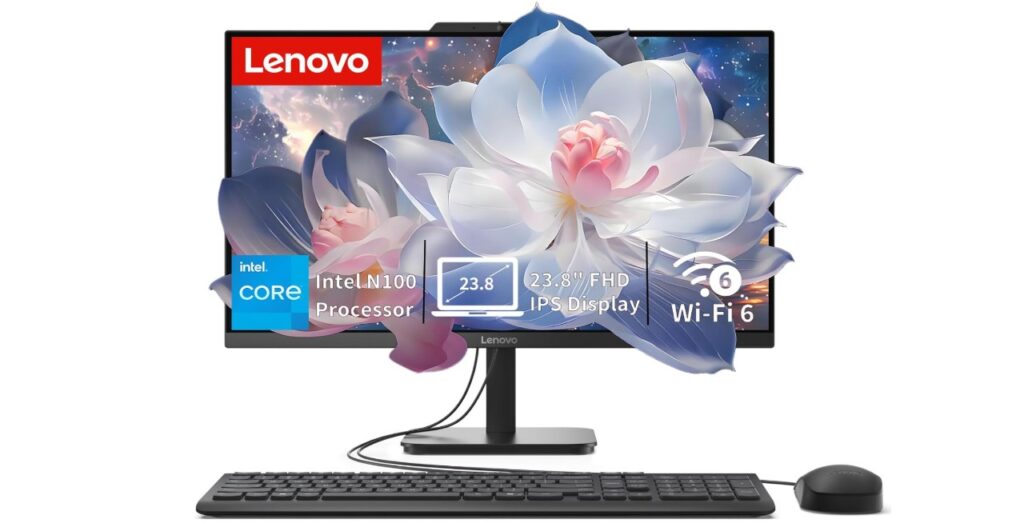
Lenovo IdeaCentre All-in-One Desktop Computer Review – The Lenovo IdeaCentre All-in-One (AIO) is designed for households, students, and professionals who want a reliable desktop computer without the clutter of traditional towers and cables. With a 24-inch Full HD IPS anti-glare display, 16GB RAM, 512GB SSD, and an Intel 4-core processor, this machine balances performance, simplicity, and affordability. Let’s break down what makes this AIO desktop appealing for everyday use.
🖥️ Design and Build Quality
The Lenovo IdeaCentre AIO is sleek and minimalist, making it ideal for modern workspaces. The 24-inch display is framed by slim bezels, giving it a clean look and maximizing screen real estate.
- Form factor: All-in-one design integrates the computer into the monitor, reducing desk clutter.
- Stand: Adjustable tilt stand for ergonomic viewing.
- Build: Sturdy plastic housing with a matte finish.
- Aesthetic: Professional yet home-friendly, blending into study rooms, offices, or living spaces.
This design is particularly appealing for users who want a space-saving desktop without sacrificing screen size.
🌈 Display Quality
The 24-inch Full HD (1920×1080) IPS panel is one of the highlights of this AIO.
- IPS technology: Wide viewing angles, consistent colors, and sharp visuals.
- Anti-glare coating: Reduces reflections, making it comfortable for long hours of use.
- Brightness: Adequate for indoor use, though not as vibrant as high-end monitors.
- Use cases: Perfect for browsing, streaming, video calls, and productivity tasks.
While it’s not a 4K display, the FHD resolution is more than sufficient for everyday computing and entertainment.
⚡ Performance and Hardware
The Lenovo IdeaCentre AIO is powered by an Intel 4-core processor, paired with 16GB RAM and a 512GB SSD.
- Processor: Efficient quad-core CPU suitable for multitasking, office applications, and light creative work.
- RAM: 16GB ensures smooth multitasking, allowing multiple apps and browser tabs without slowdown.
- Storage: 512GB SSD provides fast boot times, quick app launches, and ample space for documents, media, and software.
- Graphics: Integrated Intel graphics, sufficient for casual gaming and video playback but not ideal for heavy 3D rendering.
This configuration makes the AIO ideal for students, professionals, and families who need a reliable everyday computer.
🔋 Connectivity and Features
Connectivity is a strong point of this Lenovo AIO.
- Wi-Fi 6: Faster, more stable wireless internet connection.
- Bluetooth 5.2: Reliable pairing with peripherals like keyboards, mice, and headphones.
- Ports: Multiple USB ports, HDMI, and audio jacks for external devices.
- Webcam & speakers: Built-in webcam for video calls and integrated speakers for casual media consumption.
The inclusion of Wi-Fi 6 and Bluetooth 5.2 ensures future-proof connectivity, making this desktop suitable for modern households.
🖥️ Software – Windows 11 Home
The AIO comes pre-installed with Windows 11 Home, offering:
- Modern interface: Centered taskbar, rounded corners, and improved multitasking features.
- Productivity tools: Microsoft Office compatibility, Teams integration, and enhanced virtual desktops.
- Security: Built-in Windows Defender and regular updates.
- Ease of use: User-friendly for both beginners and experienced users.
Windows 11 enhances the overall experience, making the Lenovo IdeaCentre AIO ready for both work and play.
🎯 Everyday Usability
This desktop is designed for everyday use, meaning it excels in tasks like:
- Web browsing and online learning.
- Office productivity (Word, Excel, PowerPoint).
- Streaming movies and music.
- Video calls and online meetings.
- Light photo editing and casual gaming.
It’s not meant for high-end gaming or professional video editing, but for most households, it’s more than capable.
🌍 Sustainability and Value
Lenovo emphasizes energy efficiency and durability in its AIO lineup.
- Energy-efficient components: Lower power consumption compared to traditional desktops.
- Space-saving design: Reduces clutter and promotes minimalist setups.
- Value: Affordable compared to buying separate monitor + desktop tower.
📊 Pros and Cons
Pros
- Sleek all-in-one design saves space.
- 24″ FHD IPS anti-glare display.
- 16GB RAM for smooth multitasking.
- 512GB SSD for fast performance.
- Wi-Fi 6 and Bluetooth 5.2 connectivity.
- Windows 11 Home pre-installed.
Cons
- Quad-core processor limits heavy workloads.
- Integrated graphics not suitable for advanced gaming.
- Display brightness could be higher.
- Speakers are adequate but not premium.
📊 Comparison Table
| Feature | Lenovo IdeaCentre AIO | HP Pavilion AIO | Dell Inspiron AIO |
| Display | 24″ FHD IPS | 23.8″ FHD IPS | 24″ FHD IPS |
| RAM | 16GB | 12GB | 16GB |
| Storage | 512GB SSD | 256GB SSD | 512GB SSD |
| Processor | Intel 4-core | AMD Ryzen 5 | Intel i5 |
| Connectivity | Wi-Fi 6, BT 5.2 | Wi-Fi 5, BT 5.0 | Wi-Fi 6, BT 5.1 |
| OS | Windows 11 Home | Windows 11 Home | Windows 11 Home |
📝 Final Verdict
The Lenovo IdeaCentre All-in-One Desktop Computer (24″ FHD IPS, 16GB RAM, 512GB SSD, Intel 4-Core, Wi-Fi 6, Bluetooth 5.2, Windows 11 Home) is a fantastic choice for households, students, and professionals who need a reliable everyday computer. It’s not built for heavy gaming or professional creative workloads, but it shines in productivity, entertainment, and online communication.
Its sleek design, strong multitasking performance, modern connectivity, and Windows 11 integration make it one of the best value AIO desktops in 2026. If you want a clutter-free, efficient, and affordable desktop solution, the Lenovo IdeaCentre AIO is well worth considering.